NEW Wi-Fi 7 지원 엔터프라이즈급 WBE630S AP 출시  자세히 보기 →
제품 / 자료 검색

GS1350 Series

GS1350-18HP

18-port GbE Smart Web Managed PoE Switch

  • 주요 L2 기능 지원
    • CLI 기반의 L2 스위치
    • Web GUI 방식의 쉬운 기능설정 및 관리
  • IEEE 802.3at PoE Plus 적용
    • 포트당 30W
    • 최대 250W PoE 전원 지원
  • 전력 및 데이터 최대 250M까지 확장 지원
  • 손쉬운 관리 기능 지원
    • Automated camera recovery
    • Continuous Power over Ethernet
    • Handy tools on the front panel
    • Configure Port Clone
  • 네트워크 보호 기능
    • Loop Guard
    • CPU Protection
    • DHCP Snooping
    • Dual image & configuration files
  • ZyXEL One Network(ZON) 지원
    • ZyXEL One Network Utility
    • Smart Connect
  • IPv6 지원
장비 도입 사이트
한화금융센터
현대그린푸드
Data Sheet User Guide Firmware

Overview

GS1350 시리즈는 기가비트 속도를 지원하는 L2 기반의 18포트, 26포트 스마트 관리형 PoE 스위치로 GbE RJ-45와 SFP 포트를 지원하는 GS1350-18HP, 26HP 모델로 구성되어 있습니다. GS1350-18HP/26HP는 각각 16/24개의 PoE 포트를 지원하며, 포트당 30W, 최대 250W/375W의 전력을 공급하여 인터넷 전화, 보안용 감시 카메라, 무선 네트워크 구축 등 별도의 전원 없이 이더넷 케이블을 통해 충분한 전력을 공급할 수 있습니다.

또한 네트워크 확장성을 위한 2개의 Combo (RJ45/SFP) 포트를 SFP 슬롯으로 사용할 경우 장거리 네트워크 구축이 가능합니다. GS1350 시리즈는 Extended-range mode 기능을 제공하여 전력과 데이터를 최대 250M까지 확장 지원이 가능합니다. CCTV 네트워크를 구축할 때 별도의 추가 스위치 없이 장거리 구축이 가능하여 초기 네트워크 비용을 절약합니다.

효율적인 QoS 및 트래픽 관리를 위해 포트별 Multicast/Broadcast 기능, 포트 기반 Rate limiting, 802.1p 기반 Prioritization 기능 등을 지원하며, 네트워크 보안 및 안정성을 높이기 위해 Loop Guard, CPU Protection, DHCP Snooping, Dual image, Configuration files와 같은 기능을 지원합니다. GS1350 시리즈는 비전문가도 쉽고 간단하게 사용할 수 있는 네트워크 통합 관리 솔루션인 ZYXEL One Network를 지원하여 기업뿐만 아니라 아파트 및 공장, 병원, 관공서 등에서 별도의 확장 스위치 없이 장거리 구축 환경에 적합한 스위치로 “Best price per Value Rate”를 실현시킨 기가비트 스마트 관리형 스위치입니다.

GS1350 시리즈 구성

Advanced PoE Solution

IEEE 802.3af 와 802.3at PoE Plus 표준을 지원하는 GS1350 시리즈는 16, 24개의 포트에서 포트당 30W의 전력을 공급하여 CCTV용 IP 카메라, 무선 AP, IP 전화기 등 PoE 전력을 사용하는 네트워크 장비에 이더넷 케이블을 통해 전력과 데이터를 동시에 전달할 수 있습니다. 특히 지능형 PoE 기술인 Consumption Mode를 설정할 경우 스위치에서 전원 공급 장치가 실제 필요로 하는 전력만을 공급하여 불필요한 전력 소비를 줄일 수 있습니다.

Advanced PoE Solution

Extended Range Mode

최대 100m까지 전력 및 데이터를 제공하는 기존 PoE 스위치들과는 다르게 GS1350 시리즈는 Extended Range 기능을 적용시켜 최대 250m까지 연장되는 확장성을 갖추었습니다. IP 카메라가 넓고 다양한 공간에 설치되는 아파트나 공장에서는 별도의 추가 확장 스위치를 줄여줌으로써 초기 네트워크 비용을 줄일 수 있습니다.

Extended Range Mode

Automated camera recovery

GS1350 시리즈는 카메라 복구 기능을 탑재하여, LLDP 기능을 이용해 카메라 문제 발생 시 자동으로 감지, 해당 카메라를 재부팅시켜주고 기록을 남깁니다. LLDP를 미지원하는 카메라도 Ping을 이용하여 응답이 없는 경우 자동으로 카메라를 재부팅하여 장애 복구 시간을 최소화합니다.
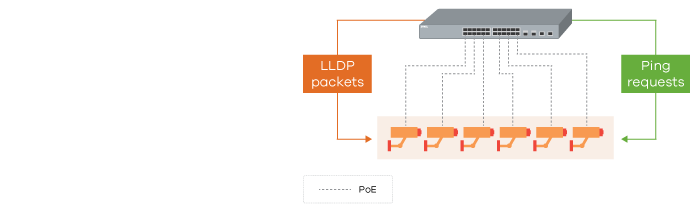
Automated camera recovery

Continuous Power over Ethernet

스위치의 Config 변경, 펌웨어 업데이트 등의 유지보수 또는 비정상적인 재부팅이 발생하는 경우에도 PoE 전력 공급을 중단 없이 제공합니다. 전력을 계속 공급하여 카메라의 불필요한 재부팅을 방지하며, 복구 및 작업 시간을 최소화합니다.

강력한 네트워크 안정성 보장

Loop Guard, CPU Protection, IP Source Guard, Dual image & configuration file 등 주요 L2 기능 및 보안 기능을 제공하여 네트워크 오류를 방지하고 안정성을 보장합니다. 복잡한 설정 과정을 생략하고 웹 GUI 환경에서 클릭만으로 필요한 기능을 활성/비활성화하여 비전문가도 쉽게 관리할 수 있도록 절차를 단순화하였습니다.

ZyXEL One Network — 네트워크 통합 관리 솔루션

ZyXEL One Network(ZON) 솔루션은 비전문가도 쉽고 간단하게 사용할 수 있도록 웹 브라우저를 통해 스위치 설정 및 관리가 가능한 GUI 환경을 제공합니다. 자이젤 스위치와 무선 AP 장비들을 하나의 네트워크로 효율적으로 관리할 수 있는 ZON Utility 및 ZyXEL Smart Connect와 ZyXEL iStacking 같은 네트워크 통합 관리 솔루션을 통해 네트워크 구축 시 초기 투자 비용을 줄이고 반복적이고 비효율적인 작업을 최소화할 수 있습니다.

ZYXEL One Network(ZON) Utility는 윈도우 기반의 소프트웨어로서 비전문가도 쉽게 사용할 수 있는 인터페이스를 제공합니다. 기본 IP 설정, 장비 재부팅, 펌웨어 업그레이드, 암호 재설정, ZyXEL AP Configurator 연동 등 동일 도메인 내의 자이젤 스위치, AP, UTM 장비를 최대 250대까지 검색 및 설정이 가능합니다.

ZyXEL One Network

Smart Connect

Smart Connect 기능이 탑재된 스위치나 AP를 통해 1) 근접된 자이젤 네트워크 장비(스위치, AP, UTM)를 검색하고 2) 원격에서 네트워크 장비 설정이 가능하도록 다른 자이젤 네트워크 장비의 Web GUI 화면을 연동하거나 3) 장비의 재부팅 및 4) 설정 초기화가 가능하여 네트워크 장애가 발생할 경우 빠른 원인 파악이 가능할 뿐만 아니라 장애 복구 시간을 단축할 수 있습니다.

추가적으로 GS1350 시리즈는 ZYXEL(자이젤) 장비뿐만 아니라 LLDP를 지원하는 CCTV에 대하여 포트별 1) CCTV의 Health 체크와 2) CCTV의 제조사 및 모델 정보 3) CCTV의 초기화 및 재부팅이 가능합니다. LLDP를 지원하지 않는 CCTV도 포트별 연결 속도와 PoE 사용량, CCTV 재부팅 기능을 지원하여 직접 CCTV 위치로 이동하지 않아도 스위치 내에서 관리가 가능합니다.

ZyXEL One Network Nebula

Specification

Model GS1350-18HP GS1350-26HP
Product name 16-port GbE Smart Managed PoE Switch with GbE Uplink 24-port GbE Smart Managed PoE Switch with GbE Uplink
Switch class Smart Managed Smart Managed
Port Density
Total port count 18 26
100/1000 Mbps 16 24
Gigabit SFP - -
Gigabit combo (RJ-45/SFP) - -
Configurable extended range ports 16 16
PoE
PoE ports 16 24
Total PoE budget (watt) 250 375
PoE Standard 802.3af/at 802.3af/at
Performance
Switching capacity (Gbps) 36 52
Forwarding rate (Mpps) 26.7 38.7
Packet buffer (byte) 525K 525K
Power
Input 100 - 240 V AC, 50/60 Hz 100 - 240 V AC, 50/60 Hz
Max. power consumption (watt) 300.9 448.9
Physical Specifications
Dimensions (WxDxH)(mm/in.) 330 x 230 x 44 /12.99 x 9.06 x1.73 441 x 270 x 44 /17.36 x10.63 x 1.73
Weight (kg/lb.) 2.42/5.34 3.58/7.89
Included accessories - Power cord
- Rack mounting kit
- Power cord
- Rack mounting kit
ESD/Surge Protections
Ethernet port surge protection 4 KV 4 KV
Power supply surge protection: Line-GND 4 KV 4 KV
Power supply surge protection: Line-Line 2 KV 2 KV
Ethernet port ESD protection (air/contact) 15 KV/8 KV 15 KV/8 KV
Environmental Specifications
Operating Temperature -20°C to 50°C/-4°F to 122°F Humidity 5% to 95% (non-condensing) Temperature -20°C to 50°C/-4°F to 122°F Humidity 5% to 95% (non-condensing
Storage Temperature -40°C to 70°C/-40°F to 158°F Humidity 5% to 95% (non-condensing) Temperature -40°C to 70°C/-40°F to 158°F Humidity 5% to 95% (non-condensing)
MTBF (hr) 1,699,692.18 888,495
Heat dissipation (BTU/hr) 1,026.07 1,530.75
Acoustic noise @ 25°C (dBA) 39 40.1

*All specifications are subject to change without notice.

Standard Compliance

  • IEEE 802.3 10Base-T Ethernet
  • IEEE 802.3u 100Base-Tx Ethernet
  • IEEE 802.3ab 1000Base-T Ethernet
  • IEEE 802.3z 1000Base-X
  • IEEE 802.3af PoE
  • IEEE 802.3at PoE+ 
  • IEEE 802.3bt PoE++ (Port 1 and 2 for GS1350-6HP)
  • IEEE 802.3az EEE support/Green Ethernet
  • IEEE 802.1p CoS support

Resilience and Availability

  • IEEE 802.1D Spanning Tree Protocol(STP)
  • IEEE 802.1w Rapid Spanning Tree Protocol (RSTP)
  • IEEE 802.3ad LACP (Max # Trunks/Links per Trunk):
    GS1350-18HP: 8/8
    GS1350-26HP: 8/8
  • Loop guard
  • Dual configuration files
  • Dual images

Traffic Control

  • 802.1Q Static VLANs: 256
  • Port-based VLAN
  • Voice VLAN
  • MAC-based VLAN
  • Vendor ID based VLAN
  • VLAN Trunking
  • LACP algorithm of source/destination IP

Security

  • Layer 2 MAC filtering
  • Static MAC forwarding
  • SSH v2
  • SSL
  • Port isolation
  • CPU protection
  • SHA2 HTTPS Certification
  • Login authentication by RADIUS
  • RADIUS accounting
  • Authorization on RADIUS
  • Multiple RADIUS servers
  • DHCP Snooping

Quality of Service (QoS)

  • 802.1p queuing methods: SPQ, WRR, WFQ
  • Storm control: broadcast, multicast, unknown unicast (DLF)
  • Port-based rate limiting (ingress/egress)
  • 802.3x flow control
  • 802.1p Class of Service (SPQ, WFQ, SPQ/WFQ combination capable)
  • DiffServ (DSCP)

Layer 2 Multicast

  • L2 Multicast
  • Static L2 Multicast Forwarding
  • IGMP snooping (v1, v2, v3)

Manageability

  • SNMP v1, v2c, v3
  • SNMP trap group
  • RMON (1, 2, 3, 9)
  • ICMP echo/echo reply
  • Syslog
  • Display port utilization
  • IEEE 802.1AB LLDP
  • IEEE 802.1AB LLDP-MED
  • Custom default

PoE Management

  • Power-up mode selection
  • Scheduled PoE
  • Neighbor PD detection
  • Auto PD recovery
  • Continuous PoE
  • Extended range*
  • PoE consumption/classification modes
  • Port PoE Priority
  • Customizable maximum power per port
  • PoE Wide range detection
  • LLDP-Power via MDI

IPv6 Management

  • IPv6 over Ethernet (RFC 2464)
  • IPv6 addressing architecture (RFC 4291)
  • Dual stack (RFC4213)
  • ICMPv6 (RFC4884)
  • Path MTU (RFC 1981)
  • Minimum Path MTU size of 1280 (RFC 5905)
  • Encapsulation for maximum PMTU
  • size of 1500
  • Neighbor Discovery (RFC4861)

Device Management

  • Web interface
  • Setup Wizard
  • Full managed CLI through Telnet/SSHv2
  • Management through Web, SNMP
  • Remote firmware upgrade by FTP/Web
  • Configuration saving and retrieving
  • Configure clone
  • DHCP client
  • DHCP relay per VLAN
  • Daylight saving
  • NTP (IPv4/IPv6)
  • Port mirroring
  • Restore to last custom default

MIB

  • Zyxel private common MIB
  • RFC 1066 TCP/IP-based MIB
  • RFC 1213, 1157 SNMPv2c/v3 MIB
  • RFC 1493 bridge MIB
  • RFC 1643 Ethernet MIB
  • RFC 1757 RMON group 1, 2, 3, 9
  • RFC 2011, 2012, 2013 SNMPv2 MIB
  • RFC 2233 SMIv2 MIB
  • RFC 2358 Ethernet-like MIB
  • RFC 2674 bridge MIB extension
  • RFC 2819, 2925 Remote Management MIB
  • RFC 3621 Power Ethernet MIB
  • RFC 4293 Management Information Base (MIB) for IP
  • RFC 4292 IP forwarding table MIB
  • RFC 4022 management information base for transmission control protocol
  • RFC 4113 management information base for user datagram protocol

Zyxel One Network

  • ZON Utility
    • Discovery of Zyxel switches, APs and gateways
    • Centralized and batch configurations:
      • IP configuration
      • IP renew
      • Device factory reset
      • Device reboot
      • Device locating
      • Web GUI access
      • Password configuration
      • One-click quick association with Zyxel AP Configurator (ZAC)
    • Automatic detection of the latest firmware
    • Displays device serial number and hardware version
    • Cloud mode on/off option for Hybrid series devices
  • Smart Connect
    • Discover neighboring devices
    • One-click remote management access to the neighboring Zyxel devices
    • Reset neighboring devices remotely to factory defaults
    • Power cycle neighboring powered devices (PoE switches only)

Certifications

  • EMC:
    • CE, FCC, C-Tick, Class A
    • BSMI CNS13438
  • Safety:
    • LVD EN62368-1
    • BSMI CNS14336-1
  • RoHS compliant

Installation Features

  • Ethernet port lightning surge protection
  • Power supply lightning surge protection
  • ESD (electrostatic discharge)protectionzv
  • Extended range of up to 250 meters*
    • Fixed link speed at 10 Mbps
    • Limited to 802.3af PDs and cameras

Warranty

  • Limited life-time warranty**

  • * Extended range excels long range installation but the actual performance may be effected by cabling quality or IP camera's electrical design. We recommend users to test for IOP before physical deployment. Contact Zyxel for IP camera's interoperability report.
    ** Warranty terms, service availability, and service response times may vary
자이젤코리아
전문 엔지니어와 상담하세요.

네트워크 전문 엔지니어가
직접 확인 후 답변드립니다.

문의하기 제품 찾기